As I wind down my first semester as the Tech Instruction Coordinator, I am feeling good about going into the next semester with a solid plan of action for our study hall students. After completing the seven steps of the "Learning Specialist/Instructional Specialist Proposal," I am confident that my plan of having students spend two days a week practicing math on Khan Academy will end up being something that really helps these students. One of the reasons I was hired to do this job was because of the success my students had from using technology, and I can credit a lot of that to Khan Academy. Now that we will have all of the study hall students dedicating at least an hour of their week to the site, we will be able to hopefully make the same positive impact on nearly 400 students. This process allowed me to develop a plan that received support across the board, at least from the adults in the building.
There have certainly been some challenge from the students. A few of them have even threatened to start a petition to show their displeasure, but never followed through. Their negativity is not going to deter me from my plan, though, as I truly believe this can help our students gain more opportunities later on in life. One reason I liked teaching middle school is that students are still able to develop academically without many real consequences, such as a poor GPA or test scores that will effect college and scholarship applications. I am constantly preaching to kids that this is a crucial time for them to decide that they want to take school seriously, because once they become a freshman everything starts to really count towards their future. Students know I have their best interest in mind, which is why I think they will eventually just accept the fact that they can't have complete free time in study hall five days a week. Even if there are only one-third of the students in each study hall that really take their time on Khan Academy seriously, then at least we will have made a difference for those students. After presenting in the study halls, some students have spent over 1,000 minutes practicing skills on the site in less than a month! I love being able to use my math background in my role as the Tech Specialist, and I am eager to find more ways to reach all of the students in our school.
Thursday, December 13, 2018

Sunday, November 18, 2018
Reflecting on my First Proposal as a Technology Specialist
I am almost halfway through my first year as the Technology Instruction Coordinator at my school, and developing a technology proposal for EDU777 has been one of the most exciting parts of my year. Step one, which was brainstorming ideas for a new proposal, really forced me to focus my energy towards fixing an issue that exists in my school. For my proposal I wanted to address something that has bothered me as a math teacher in previous years, which is that many students are not making the most of their time in study halls. My school is very data driven, and being a competitive person myself, I want our students to maximize their potential so that they not only show growth, but they have as many opportunities as any student in any other district. An idea that I have heard at several conferences this school year has been introducing ideas by first explaining, "What is your why?" After going through step two of this project, I felt like I had done enough research to know exactly how to express my "why", which was well received by almost everyone I talked to. The administrators in my building were excited about this idea, especially since I was going to be doing almost all of the work that went with it. When I laid out the details of how this would help us meet our school goals of getting 80% of our students to meet their growth goal, and 25% of our students to "exceed" on the PARCC exam, the math teachers were on board as well since their students would be practicing math outside of their class time with no extra effort on their end.
Not everyone was excited about this proposal, though. One of the math teachers was concerned that students would not be completing their homework and use Khan Academy as an excuse. My response was that they could start assigning Khan Academy as homework instead of paper homework, which is what I used to do as a teacher, since it is automatically graded and provides instant feedback for the students. Some teachers are just uncomfortable with relying on technology so much, but I will continue to push for this as the Technology Coordinator. Despite most of the study hall supervisors being excited at having more structure in the study halls, some were concerned that this would put pressure on them to get their students in line. I told them that I would support them any way that I can. When I have brought this up to students, they were certainly the least excited. It seems the eighth graders were the most disappointed, probably because they've had the previous two years with free reign during their study halls. I know that it is what is best for them, so I will continue to push them on this.
I am still very excited about this project and know that it will lead to great learning for many of our students. I was one of the only teachers in our school that utilized Khan Academy, and despite pushing it on everyone this year as the Tech Coordinator, there are still some teachers that have no interest in using it. By asking students to work on it two days a week during their study halls, I am theoretically guaranteeing that one-third of our students are spending an extra hour practicing math that might have otherwise been spent playing games or talking with friends. The most negative aspect is trying to figure out how to motivate those students that will resist and refuse to use this time wisely. I do not want this to be a punishment for students, so I will have to find ways for them to have intrinsic motivation to get better at math. I have already developed presentations that talk about the value of a growth mindset, the opportunities that they could create for themselves by being great at math, and data that proves Khan Academy works. As the Technology Instruction Coordinator, I am trying to make myself as valuable to my school as possible. If I am only suggesting what tech tools teachers can use in their classrooms, I have no way of guaranteeing this is done with fidelity. I will use my expertise as an Instructional Designer for middle school math by sharing the spreadsheets I have developed with Khan Academy links for each concept taught in middle school, which includes prerequisite skills and extension skills for every standard. Since I have positive experiences with Khan Academy and consider myself a Learning Specialist in the middle school math world, this proposal is something that I truly believe will help me make an impact on my students.
Not everyone was excited about this proposal, though. One of the math teachers was concerned that students would not be completing their homework and use Khan Academy as an excuse. My response was that they could start assigning Khan Academy as homework instead of paper homework, which is what I used to do as a teacher, since it is automatically graded and provides instant feedback for the students. Some teachers are just uncomfortable with relying on technology so much, but I will continue to push for this as the Technology Coordinator. Despite most of the study hall supervisors being excited at having more structure in the study halls, some were concerned that this would put pressure on them to get their students in line. I told them that I would support them any way that I can. When I have brought this up to students, they were certainly the least excited. It seems the eighth graders were the most disappointed, probably because they've had the previous two years with free reign during their study halls. I know that it is what is best for them, so I will continue to push them on this.
I am still very excited about this project and know that it will lead to great learning for many of our students. I was one of the only teachers in our school that utilized Khan Academy, and despite pushing it on everyone this year as the Tech Coordinator, there are still some teachers that have no interest in using it. By asking students to work on it two days a week during their study halls, I am theoretically guaranteeing that one-third of our students are spending an extra hour practicing math that might have otherwise been spent playing games or talking with friends. The most negative aspect is trying to figure out how to motivate those students that will resist and refuse to use this time wisely. I do not want this to be a punishment for students, so I will have to find ways for them to have intrinsic motivation to get better at math. I have already developed presentations that talk about the value of a growth mindset, the opportunities that they could create for themselves by being great at math, and data that proves Khan Academy works. As the Technology Instruction Coordinator, I am trying to make myself as valuable to my school as possible. If I am only suggesting what tech tools teachers can use in their classrooms, I have no way of guaranteeing this is done with fidelity. I will use my expertise as an Instructional Designer for middle school math by sharing the spreadsheets I have developed with Khan Academy links for each concept taught in middle school, which includes prerequisite skills and extension skills for every standard. Since I have positive experiences with Khan Academy and consider myself a Learning Specialist in the middle school math world, this proposal is something that I truly believe will help me make an impact on my students.
Sunday, October 14, 2018
Social Media in the Classroom
The use of social media has taken society by storm, and the percentage of the population that participates in social networking increases more and more each year. At this point it is hard to imagine a world where it did not exist. According to the Pew Research Center, 88% of 18-29 year olds use some form of social media, and the same is true for 78% of people falling between the ages 30-49. It is how people many young adults have connected with more than just the people they see in person, and the same is true for students. Facebook and Twitter continue to be power houses of social networking, and Instagram, Snapchat, and YouTube are becoming increasingly popular, especially amongst young people. Social media can be good in some cases, but it definitely can be a burden as well. Cyber bullying, the spread of false information, and lack of face-to-face communication are all
examples of how social media can be a threat to society. So where does the use of social media fall into education? It is inevitable that most students are going to participate in social networking at some point in their education, so it is important that schools teach students how to use the sites appropriately. If teachers are able to incorporate social media into their classroom, they can model how to use the sites professionally. I read the article titled "8 Social Media Strategies For Your Classroom" by Adam Renfro to look for some advice on how to best utilize social network sites with students.
Renfro shared advice for using specific sites. One idea he presented for using Twitter was to create a class hashtag so that students and teachers can communicate with each other. You could hold a class discussion on the site outside of school hours, or students could ask questions about an assignment to each other using the hash tag. I like the idea of a teacher holding their own Twitter chat and having students post using the hash tag. This would be a great way to hold a discussion on a forum that many young people are comfortable with. He also mentioned creating a class Facebook page, which might be good to share out with parents as well as students. This would be especially helpful if the school did not already have a learning management system they were using. I like to post updates on Schoology for parents and students to see, which you could also do using Twitter or Facebook. He also brings up using Google Plus to create a PLN, which I had not considered because I do not know anyone that uses it, but I will have to look into it. Renfro mentions using "SchoolTube" as a tool for flipping the classroom. This is a safe place where you can upload your own videos, or find ones that were created by other teachers. Sometimes YouTube is hard to find the best videos since there are so many, so it seems like SchoolTube would be a good way to narrow the search.
In the article, Renfro states "Catch them where they are," meaning use a site that students are already using. The article was written in 2011, so I would imagine he would include Instagram,YouTube, Pinterest and Snapchat if it were written today. I have seen a lot of teachers use the sites in their classrooms to engage students. Some of the tools mentioned in the article are outdated, but the ideas on using them hold true today. The point is that whatever platforms are popular now probably will be taken over by new sites within ten year, which means it important for educators to figure out what their students are using, and they should not get discouraged if a site they have used for years is suddenly a drag for students. All you can ask is for teachers to continue trying to connect and engage their students in as many ways as possible.
 |
| Image Source |
Renfro shared advice for using specific sites. One idea he presented for using Twitter was to create a class hashtag so that students and teachers can communicate with each other. You could hold a class discussion on the site outside of school hours, or students could ask questions about an assignment to each other using the hash tag. I like the idea of a teacher holding their own Twitter chat and having students post using the hash tag. This would be a great way to hold a discussion on a forum that many young people are comfortable with. He also mentioned creating a class Facebook page, which might be good to share out with parents as well as students. This would be especially helpful if the school did not already have a learning management system they were using. I like to post updates on Schoology for parents and students to see, which you could also do using Twitter or Facebook. He also brings up using Google Plus to create a PLN, which I had not considered because I do not know anyone that uses it, but I will have to look into it. Renfro mentions using "SchoolTube" as a tool for flipping the classroom. This is a safe place where you can upload your own videos, or find ones that were created by other teachers. Sometimes YouTube is hard to find the best videos since there are so many, so it seems like SchoolTube would be a good way to narrow the search.
In the article, Renfro states "Catch them where they are," meaning use a site that students are already using. The article was written in 2011, so I would imagine he would include Instagram,YouTube, Pinterest and Snapchat if it were written today. I have seen a lot of teachers use the sites in their classrooms to engage students. Some of the tools mentioned in the article are outdated, but the ideas on using them hold true today. The point is that whatever platforms are popular now probably will be taken over by new sites within ten year, which means it important for educators to figure out what their students are using, and they should not get discouraged if a site they have used for years is suddenly a drag for students. All you can ask is for teachers to continue trying to connect and engage their students in as many ways as possible.
Friday, October 12, 2018
Reflections on the Past 8 Weeks
When I registered for this class the day before it started I felt pretty uncertain and overwhelmed. I was starting a new position at my school and taking grad school classes for the first time, and I really didn't know what to expect my work load to look like. Thankfully there was a lot of overlap between what I had to figure out for my job and what we were asked to learn about in EDU776. A few times throughout the course I was asked to help teachers at my school find a tech tool suitable for their project, and I ended up either hearing about a great tool from Mrs. Zumpano, or would be able to complete an assignment that forced me to learn more about a tool I wanted teachers to try. It was also great to read and respond to other educators' blog posts to learn about educational technology used in a variety of settings.
 |
| Image Source |
Biggest Takeaway: Twitter Chats and PLNs
Prior to this class I did not value Twitter as a place to grow as an educator. For years I had used Twitter strictly for following music, sports, and news, and to think about using it for work seemed like it would ruin it for me. I assumed teachers posting on Twitter would mainly be sharing photos of their classrooms and bragging about their students, which is great for building a positive classroom environment and recognizing students, but I did not think that it would help me grow as an educator. After participating in a few #edchats I realized the wealth of information to be had on Twitter from other people working in education. I am just starting out as a tech coach and need as many ideas as possible when teachers ask for help. It makes sense that Twitter would be a perfect place to find forward-thinking, innovative teachers who are eager to share their ideas. I am excited to participate in more Twitter chats throughout the school year and build my PLN. I have shared my experience with other people in my building and they are also getting invested with using the site for professional growth.
Taking EDU776 had an immediate positive impact on my job performance, which is not always the case when taking classes while working a full-time job. Although I had a few weeks where I was struggling to balance all of my responsibilities, I can now reflect and say that I was #BlessedToBeStressed.
Favorite Tool: Adobe Spark
My favorite new tool that I learned about in EDU776 was Adobe Spark. I had given a poor attempt at trying to use it before and given up right away. I decided to give it another shot for my Web 2.0 post, and I ended up being a huge fan. It was fun to create a narrated video on the site, and I was able to show it off to teachers at my school who will now be using it in their classes for a project.Taking EDU776 had an immediate positive impact on my job performance, which is not always the case when taking classes while working a full-time job. Although I had a few weeks where I was struggling to balance all of my responsibilities, I can now reflect and say that I was #BlessedToBeStressed.
Data Dive
 |
| Image Source
My generation was the first to really grow up with the internet. I remember being in elementary school and having to wait up to an hour for the dial-up internet to load our free version of AOL just so I could email my friend back and check to see if Barry Bonds was any closer to breaking the single-season home run record. I was all over AIM and Myspace growing up, fighting my brother for computer time every night. We had fun going into chat rooms with our friends, and one time I remember my brother got our AOL accounts temporarily banned because he swore at someone in a chat room. We denied it, but my parents had to call AOL to reactivate our accounts and they read us a transcript of what he said. This was the first time I realized that our actions on the internet could cause consequences in real-life. I learned this lesson in a low-risk situation as a 6th grader, but with the amount of information people share on social media, this mistake could have a much greater impact on their future. I am constantly hearing stories in the news about pro athletes, like quarterback Josh Allen and pitcher Josh Hader, costing themselves millions of dollars for tweets they sent out as high schoolers. For class this week we were asked to do a personal "data dive" to investigate our digital tattoo, and I was actually looking forward to taking some time to scrub the internet to see what information about me is available to the public.
What I found
After scouring several sites suggested by Mrs. Zumpano, I realized that I have very little online presence if you were to just search my name. I believe this is due to a combination of me being paranoid about social media when I started college and heard horror stories of people getting in trouble because of it, as well as having a very common name. When you search for me on Google by my legal name or my alias Jake Thompson, you will see stories about Jake Thompson the MLB pitcher and hundreds of other "Jacob Thompson"s who are more important than me. What I did not like was seeing how all of my personal information so readily available. Here is a break down of some of the highlight of what I found on the sites I searched:
Overall, I am a little relieved I didn't find anything bad out there that would hurt my reputation, but I was a little disappointed in my professional presence. After hearing about the benefits of having professional work pages show up in a Google search, I will continue to work on putting myself out there through my professional Twitter account and my website.
|

Saturday, October 6, 2018
PLN and #TwitterChats
Technology is revolutionizing education, and each year that passes it seems like there's so much more for students and teachers than the previous year. Students equipped with Chromebooks or other devices now have the world at their fingertips. I've seen first hand students close the achievement gap by pulling themselves up by their bootstraps, spending hours and hours mastering math skills on Khan Academy, growing from below average math students to the 90th percentile in just one year. I've seen social studies teachers transform a unit on culture, going from reading textbooks and watching movies about how people live in other countries to now actually having one-on-one conversations with children from all over the world through videos. With technology and a growth mindset, students have incredible possibilities for what they can accomplish in their education. The same goes for teachers. Anyone that is willing to research better methods of teaching and try out cutting edge technology as it becomes available will see major changes in their classroom and the way their students engage in learning. Most teachers I know do not have a whole lot of free time to keep up with the newest trends in educational technology, which is why is great to build a Professional Learning Network, or PLN, to get ideas from. When I moved from a school that I always planned on my own to a new school that required different teams of teachers to meet for weekly PLCs, it made the job so much easier being able to bounce ideas off of each other and see how other teachers were helping students. Even if your school does not lend you to plan collaboratively with colleagues, social media sites like Twitter are a great place to build your network and get great ideas from educators all over.
 |
| Image Source - @BrianMendler |
Twitter Chats
Twitter is by far my favorite social media site to use personally. For years I have used Twitter to keep up with current events in sports, music and politics. If there is a big cultural event happening in the world I know that I can go to Twitter and get up to the minute updates from credible news sources and hear varying opinions on the topic. I run my school's Twitter page, @conradyjaguars, and had my own personal page for professional use only that I barely used (follow me @MrThompsonCJHS). I followed various education related pages and would check from time to time, and mainly was using Twitter as a "visitor". For this PLN project we were required to participate in a Twitter chat, forcing me to step outside of my comfort zone and get involved. If you just search #edchat on Twitter, you will immediately find an endless list of posts that will inspire you to try new things in your classroom. The Twitter chat that I participated in was called #ditchbook. The chat was moderated by Adobe Education Leader and Flipgrid Ambassador Claudio Zavala, Jr. (@ClaudioZavalaJr), and he would pose questions asking participants to share ways they have used video tools to ditch the textbook to revitalize their classrooms. In less than an hour I not only learned about a lot of great new resources, I heard from people in the trenches that shared effective ways they have used the tools in their classrooms. Below I've included my post in the Twitter chat, along with other posts that I found useful.

 |
| Image Source |
 |
| Image Source - @jmattmiller |
After doing this project I have major regrets for not utilizing Twitter as a professional growth resource sooner, but I will most definitely be using it more moving forward.
Thursday, October 4, 2018
Web 2.0 Tools
When the tech coach position became open at my school over the summer, I debated applying for some time and imagined what my school year would be like in this position. It didn't take long for me to realize that this was something I would enjoy. My administrators knew that I was willing to try to figure out new tech tools in my class, and that I would encourage my team to do the same. They gave me a chance and now that I have been in the position for a few months, I realized that I had barely scratched the surface on all of the web tools available to enhance learning. Over the summer I tried to make sure I was at least proficient in the sites our school has premium memberships for, which includes Edulastic, Pear Deck, WeVideo, IXL Math, Thinglink and Schoology. I also attended an EDTech Team Conference in Naperville, and that made me feel so much more prepared going into the school year. My favorite takeaways from that conference were the new features on Google Earth, Flip Grid, and Edpuzzle. I felt like I had a lot of web tools to share out with my colleagues, but I've learned just as much from them as it turns out they also have great tools they've been using for years. Mrs. Zumpano shared Larry Ferlazzo's "Website of the Day" Blog where he creates lists of his favorite web tools throughout the year, including lists of his favorite ed tech sites for a variety of uses.
Adobe Spark
 |
| Image Source |
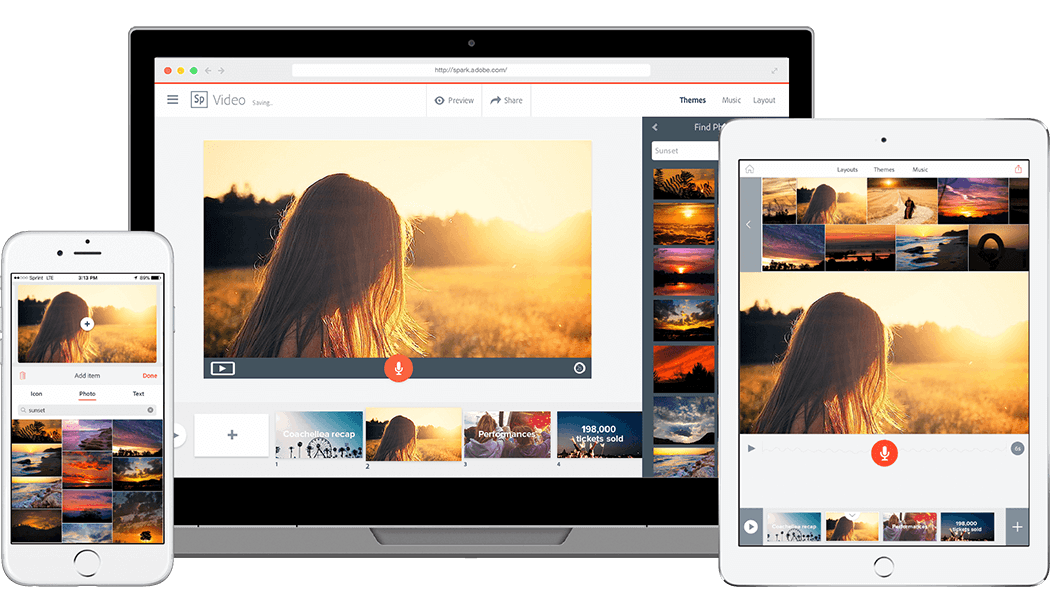
As soon as I read the directions for this week's blog post I immediately thought of Adobe Spark, a web tool that has been on my list to learn more about after hearing many teachers say good things about it. Some of the Language Arts teachers at my school asked if I would come in and demo creating a video presentation on Spark for their classes next quarter, so this was as good a time as ever to dive into it.
"Transform your ideas into stunning visual stories," is how the tool is described on the Adobe Spark webpage. Spark allows you to create professional looking graphics, web pages, and video presentations for free. There are several templates that you can choose from to edit any way you like. Just going through the templates provided some inspiration for different ways you can use the site. Ideas that stood out to me were the photo journal web pages, newsetters, and infographics. I decided to make a sample video presentation for the students I'll be presenting to, as well as a tutorial showing how to create the presentation themselves. I've included each below.
Friday, September 28, 2018
Reports on Future Learners
This week in class we were provided several reports that have important information for anyone who is invested in a child growing up in school today, from parents to district leaders. It is clear that future learners are going to be majorly impacted by technology, and I am eager to see what innovators are able to come up with in the future. Australian social research company McCrindle's Gen Z reports support this, and had some other words/facts that caught me off-guard:
I highlight other interesting facts from different reports below.
This hit home for me as I reflect on my college courses that forced me to use technology. I had a great professor, Dr. Cullen, that taught Geometry by using Geometer's Sketchpad. I learned through discovery by using this dynamic geometry program, and it made me value using technology like this in my classroom. I now use Geogebra and Desmos any time I can to create the same A-ha! moments for my students.
"From our latest findings, 60% of school principals now say that their school has adopted a 1:1 mobile device program for in-school usage, an increase of 9 percentage points in just one year." -
The Educational Equity Imperative:Leveraging Technology to Empower Learning for All
Clearly it is a great benefit for a student to have access to their own learning device, and I am happy to see that there has been a 9% increase in the past year. I expect this trend to continue.
On thing it did point out is AI can't replace the relationships and the emotions tied to human interaction between teachers and students. In the report they stated "...current iterations of AI in education are not yet equipped to supplant teachers' roles in building complex skills including critical thinking, empathy, and creativity." For this reason alone I am confident that the teaching profession is not one that will be threatened by automation. The report did point out some intriguing ways that AI could greatly benefit a classroom. "AI can extend teachers' abilities to foster collaborative learning environments; a report from education company Pearson and University College London describes the possibilities of virtual agents facilitating and moderating students' small-group discussions." Reading this quote, I laugh thinking about teachers complaining about switching from Outlook to Gmail, and can only hope that I am able to keep up with technology throughout my career.
- People falling in the Gen Z generation experience over 10 hours of tech a day
- 1 in 2 will be university educated
- KIPPERS is a lifestage that falls after young adult. What is a KIPPER? (Kids in Parents’ Pockets Eroding Retirement Savings)
- 78% of Gen Z males, and 62% of Gen Z females will be obese!
I highlight other interesting facts from different reports below.
Project Tomorrow's Speak Up
"Teachers who have experienced online and blended classes for their own professional learning demonstrate advanced uses of technology with their own students, have stronger valuations on the role of technology within learning, and higher aspirations for leveraging technology to support transformed learning environments." - 2017 Digital Learning Report from Blackboard and Speak UpThis hit home for me as I reflect on my college courses that forced me to use technology. I had a great professor, Dr. Cullen, that taught Geometry by using Geometer's Sketchpad. I learned through discovery by using this dynamic geometry program, and it made me value using technology like this in my classroom. I now use Geogebra and Desmos any time I can to create the same A-ha! moments for my students.
"From our latest findings, 60% of school principals now say that their school has adopted a 1:1 mobile device program for in-school usage, an increase of 9 percentage points in just one year." -
The Educational Equity Imperative:Leveraging Technology to Empower Learning for All
Clearly it is a great benefit for a student to have access to their own learning device, and I am happy to see that there has been a 9% increase in the past year. I expect this trend to continue.
NMC/CoSN Horizon Report
If you think about the way most classrooms looked 10 years ago compared to now in terms of the use of technology, it is hard to imagine the possibilities of what educational technology will look like 10-20 years form now. I thought the NMC Horizon Report had some fascinating ideas on what they expect for technology in the classroom. Artifical Intelligence is something that really makes my head spin when I think of all of the different ways it can impact our society, and I hadn't really imagined it in a classroom until I read this report. |
| Image Source |
Friday, September 21, 2018
Active Learning: Just Do It!
Get Active
 |
| Image Source |
Active learning needs to be happening in classrooms if schools want to keep their students passionate about getting an education. Two big projects I've been working on teachers with is building an inquiry mindset in our learners, and implementing math stations. Inquiry Mindset is a book by Trevor MacKenzie where he describes inquiry-based learning. He focuses on making learning experiences meaningful for students, saying "all students deserve a chance to dig into their passions and curiosities." I really like this idea of giving students something to think about, then allowing them to direct the next steps of their learning. To allow for this we are looking into different student-friendly research databases that are full of content and allows for students to investigate a topic of their choosing. In our block-period math classes was are trying out having the students work in stations. Even if you are an extremely engaging teacher, 80-plus minutes is a long time for anyone to sit in one spot learning. Breaking a class up and having students rotate around to different stations makes it much more difficult for a kid to check out of a lesson. Technology makes this a lot easier, as one of the stations could be having students go to Khan Academy or IXL.com, either to review a concept they didn't understand the first time, or if they are ready for a challenge they can work on lessons from the next unit or grade-level. This has been great for students with a growth mindset who always want to push themselves to the next level.
The active learning example I had to look at for class was called "One Year Told in Six Words", which was a fun project where students from Coonley Elementary School made a slide that contained a six word summary of their year. I made a Padlet below that will help you dive deeper into the project, but it was an example of active learning because kids were able to express themselves with six words and share their creativity on a slide. The project was put out for the school to see and posted on the school's Twitter, which definitely made it more meaningful for the students. As the world continues to find ways to keep children constantly entertained and distracted, it will be very important for teachers to consider how they are going to keep students interested. That starts with active learning.

Thursday, September 13, 2018
What type of tech consumer are you?
This week in Integrating Tech we are discussing what it means for a person to use technology as a "resident" versus a "visitor". David White came up with these terms when trying to think of a way to describe the different ways that people use technology. When someone uses technology as a resident, this means that they are contributing and putting themselves out there to whatever platform of technology they are using. Some examples of this would be posting often on social media, participating in an online message board, or contributing to a blog. On the other hand, a visitor would use technology either as a tool to consume information or gain services. Visitors would be those who use social media just to read what others are posting, or uses apps to boost productivity. This idea is not meant to pigeon-hole a person as totally a resident or a visitor. Each way you use a form of technology will fall somewhere on this spectrum between contributor and spectator. You can learn more about the two types of tech users on David White's website.
 |
| Image Source |
Digital Mapping
With his method of describing one's utilization of technology, David White came up with a way for people to analyze their own tech personality by creating a digital map. When creating a map, a person should consider how they use technology the most, and try to place that app/tool/platform somewhere in four quadrants. The horizontal axis of this chart has "residential" on one end, and "visitor" on the other. The other scale has the person consider whether that use of technology is for personal or professional use. Here is an example of my digital map I created on Google Drawing:
 | |||||||||||
| Images were found on Google Images |
Thursday, September 6, 2018
Technology Frameworks: SAMR Model
What is the SAMR model?
This week I'll be diving into the framework for evaluating technology that I have been working with the past four years, the SAMR model. SAMR stands for Substitution, Augmentation, Modification, and Redefinition, with each letter basically representing a different level of how a teacher is utilizing technology in their classroom.
In the image below you can see how Dr. Ruben R. Puentedura, the person most associated with the model, defines each level:
You can find more detailed information from Dr. Puentedura here: SAMR, Learning, and Assessment
Personal experiences with the SAMR model
When I started working at my school in 2014, it was the first year that the building was completely 1:1, with each student having their own Chromebook to take home each night. This was exciting for students and staff, but overwhelming for veteran teachers who had felt success teaching without computers their entire career. The SAMR model was how our administration presented the district's goals for implementation, almost like baby steps. They said after the first year teachers should at least be at the Augmentation level, and by the end of the second year teachers should be showing Modification in their classrooms. Since then our goal continues to be Remodification, which we interpret as sharing out student learning with the outside world. One teacher created a discussion board with another classroom in a neighboring town where they would post student work. My favorite example of this was the Social Studies department connecting their students with a classroom in another country through SeeSaw, which allowed their students to post videos asking and responding to questions about their differences in culture.
As a teacher I was always trying to find ways to use tech in the "transformation" level. I was able to reach Modification by creating shared formative assessments with my department that we were able to get immediate data from, using Google Drive to collaborate on documents with teachers throughout the school, and provide students with endless guided math practice through Khan Academy and IXL, which almost always resulted in student growth. Some of my lessons that I would consider Redefinition would be using Desmos to have students discover how tables, equations, and graphs were all related in linear relationships. Students would see the graph of a line after typing in a linear equation, and then they'd be able to use the line to find ordered pairs of points on the line. With this tool they were able to see tons of examples in a short amount of time, and you could see the light bulbs going off as they played around with the graphs.
As a tech coach this year, I am really excited to help out the Social Studies department with making global connections. Through the website twicecapspace.org I was able to find a teacher that wanted to do video conferences between classrooms. I emailed him, we talked through a video chat on Google Hangout, and he was able to give me a network of teachers from around the world that he's been video conferencing with for years! I'm looking forward to learning about all the different ways teachers in my school are redefining their classrooms with technology.
This week I'll be diving into the framework for evaluating technology that I have been working with the past four years, the SAMR model. SAMR stands for Substitution, Augmentation, Modification, and Redefinition, with each letter basically representing a different level of how a teacher is utilizing technology in their classroom.
In the image below you can see how Dr. Ruben R. Puentedura, the person most associated with the model, defines each level:
 |
| Image Source |
Personal experiences with the SAMR model
When I started working at my school in 2014, it was the first year that the building was completely 1:1, with each student having their own Chromebook to take home each night. This was exciting for students and staff, but overwhelming for veteran teachers who had felt success teaching without computers their entire career. The SAMR model was how our administration presented the district's goals for implementation, almost like baby steps. They said after the first year teachers should at least be at the Augmentation level, and by the end of the second year teachers should be showing Modification in their classrooms. Since then our goal continues to be Remodification, which we interpret as sharing out student learning with the outside world. One teacher created a discussion board with another classroom in a neighboring town where they would post student work. My favorite example of this was the Social Studies department connecting their students with a classroom in another country through SeeSaw, which allowed their students to post videos asking and responding to questions about their differences in culture.
 |
| Image Source |
 |
| Desmos Graphing Calculator [Image Source] |
As a tech coach this year, I am really excited to help out the Social Studies department with making global connections. Through the website twicecapspace.org I was able to find a teacher that wanted to do video conferences between classrooms. I emailed him, we talked through a video chat on Google Hangout, and he was able to give me a network of teachers from around the world that he's been video conferencing with for years! I'm looking forward to learning about all the different ways teachers in my school are redefining their classrooms with technology.
Wednesday, August 29, 2018
All about me
 Welcome to my blog, "Thompson Tech Talks." This is a momentous post for me as it marks the completion of my first assignment for my first grad school class. I am eager to continue my education and start working towards my Technology Specialist Endorsement at Dominican University. This course will be very meaningful for me because learning about the best ways to use technology in education has pretty much become my job this school year.
Lifetime in Education
From the time I realized I wasn't athletic enough to be an NBA player (...5th grade), I was pretty set on becoming a teacher. My dad was a psychology teacher, my mom is a health/PE teacher, and my brother is an English teacher. I went to Illinois State University to become a math teacher, where I met my math teacher girlfriend and several lifelong friends that are all teachers. Education has and continues to be so ingrained in my life it's hard to imagine working in any other profession.
 |
| Source: Illinois State University Seal. Digital Image. ISU Graphic Standards. January, 2009. https://universitymarketing.illinoisstate.edu/downloads/standards/ISU_GraphicStandards.pdf |
After a year of long-term subbing with no intentions of teaching middle school, I was given my first full-time teaching job at Conrady Junior High in Hickory Hills, IL. I have spent the past five years there teaching 6th and 8th grade math, and it has been an awesome experience. My favorite part of working at Conrady is getting to teach students that have moved from countries all over the world. The school is also 1:1, with each student having their own Chromebook. This allowed me to do so much more in and out of my classroom to help my students learn math, and now I couldn't imagine teaching in a classroom without technology.

Source: Conrady Junior High Logo. Conrady Junior High Homepage.
https://www.npd117.net/Domain/8
 |
| Celebrating Khan Academy's "Learnstorm" |
Source: Conrady Junior High Logo. Conrady Junior High Homepage.
https://www.npd117.net/Domain/8
I was always eager to try out new websites and tech tools with my students. Our Technology Instruction Coordinator would have "Tech PLCs" throughout the year, and I would almost always attend to learn about any new tool I could possibly use in my classroom. My favorite sites to help students learn math are Khan Academy, Desmos and Geogebra. I know that extending my classroom with technology was the key factor in getting my students to show growth every year.
This school year I decided to apply for the Tech Instruction Coordinator opening at Conrady, and I got the job. The decision to leave the classroom was really hard for me, but I am excited to share my passion for finding ways to use technology to help students, and hopefully motivate teachers to do the same. I look forward to sharing what I've learned on this blog over the next nine weeks. Here's a link to a Google Site I've been working on to help train teachers at my school: Conrady Tech Resources.
This school year I decided to apply for the Tech Instruction Coordinator opening at Conrady, and I got the job. The decision to leave the classroom was really hard for me, but I am excited to share my passion for finding ways to use technology to help students, and hopefully motivate teachers to do the same. I look forward to sharing what I've learned on this blog over the next nine weeks. Here's a link to a Google Site I've been working on to help train teachers at my school: Conrady Tech Resources.
Subscribe to:
Comments (Atom)